
Majestic Alternative: Backlink Monitoring Built for Daily Use
Discover referring pages, organize monitored domains, recheck important backlinks, review authority signals, and keep a clear history of link changes from one focused Backlinktor workspace.
- Start with a free plan
- Manual and scheduled rechecks
- Built for ongoing backlink monitoring
Backlink discovery is only the beginning.
Finding a backlink answers one question. Ongoing monitoring helps answer what happens afterward.
Discover
Find referring pages for domains and tracked URLs.
Monitor
Keep important backlinks organized after discovery.
Recheck
Confirm whether saved backlinks still exist.
Act
Investigate changes, export data, or find contact information where available.
Backlinktor is designed to turn backlink data into an ongoing operational workflow.
Know what needs your attention today.
Discover
Find backlinks for a monitored domain or target.
Review
Inspect referring pages and available SEO information.
Monitor
Keep selected links in your workspace.
Recheck
Run manual or scheduled status checks.
Act
Review history, export results, or find available contacts.
Keep ongoing backlink monitoring organized across websites.
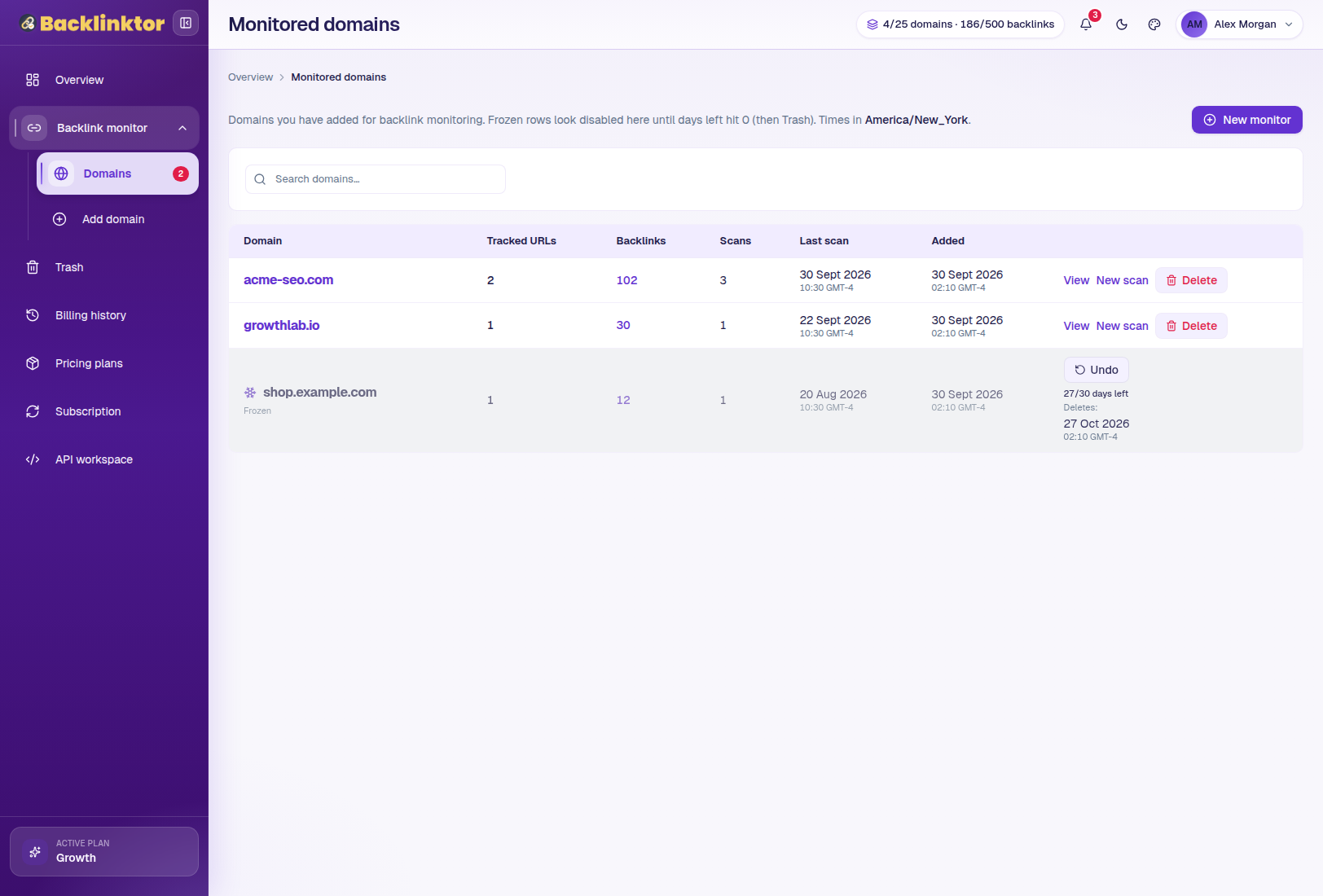
Backlinktor uses domains as top-level containers for monitored websites. Review tracked targets, backlink counts, latest scans, states, and individual domain details in one place.
Domain limits depend on plan.
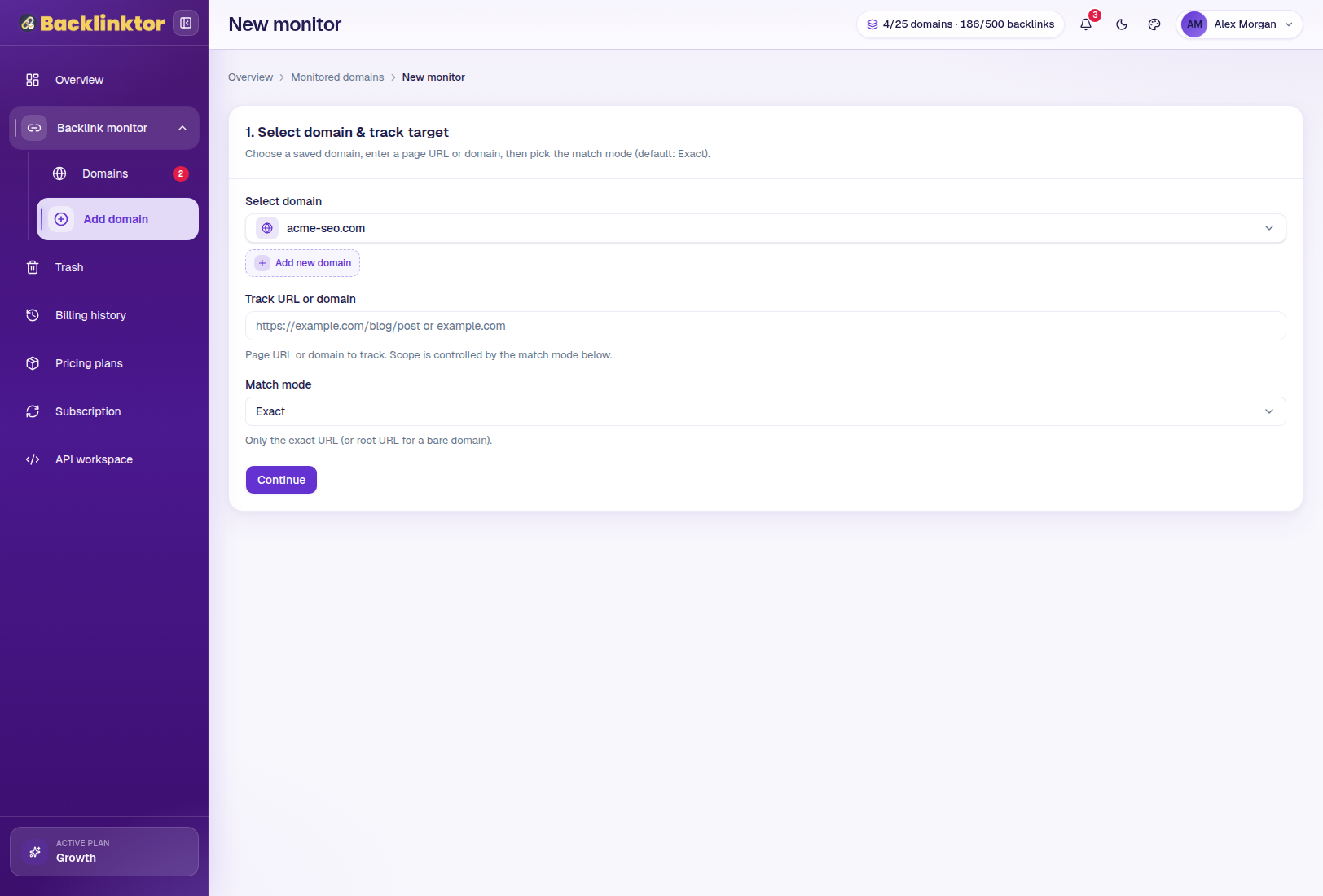
Start with a domain or specific page.
Choose an existing domain or create a new one, enter a domain or page URL, select an available match mode, then continue into backlink discovery and review referring pages.
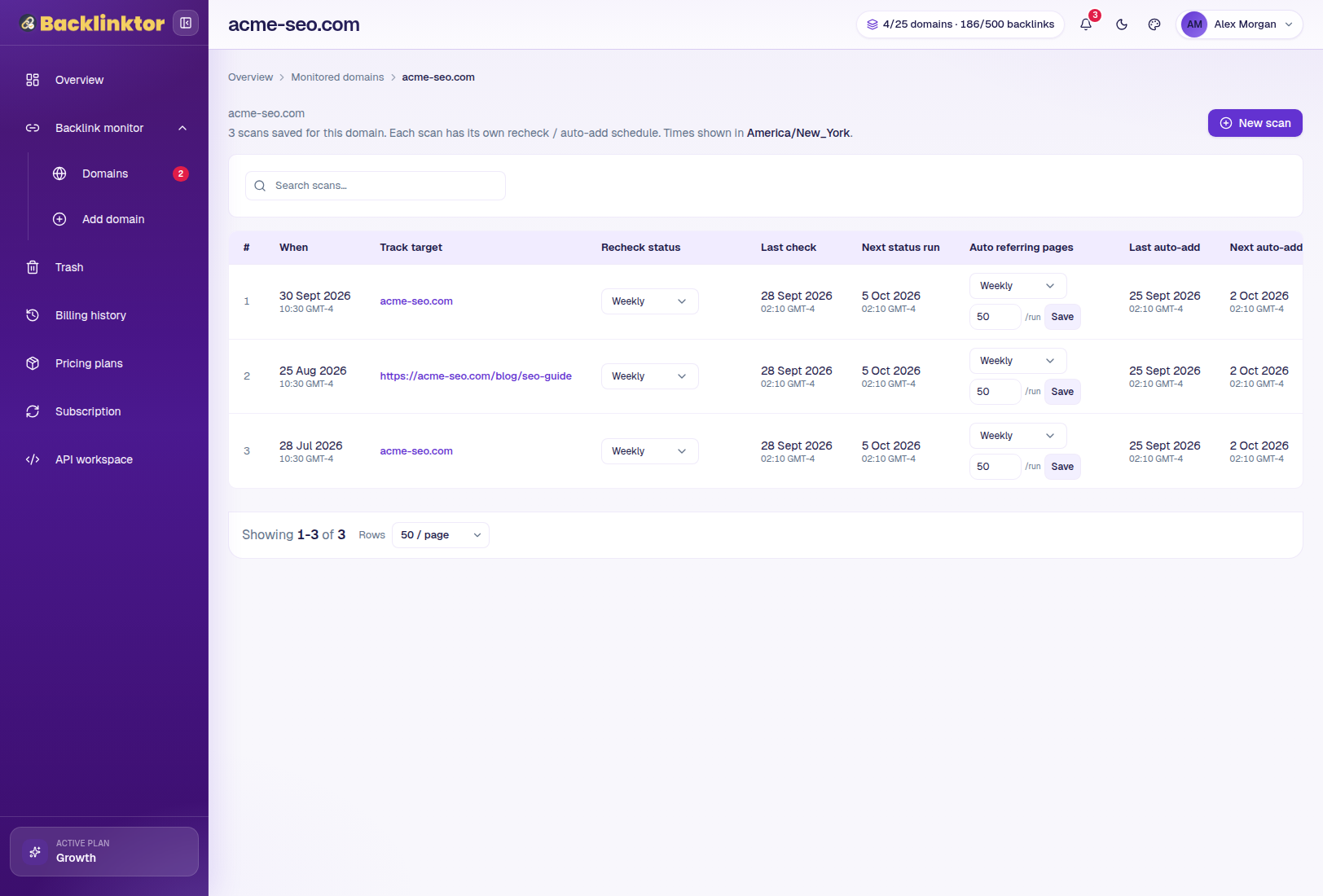
Keep targets, scans, and schedules together.
An individual domain view can bring together tracked targets, scan history, completed scans, links to full results, available recheck schedules, and auto-add schedules where supported.
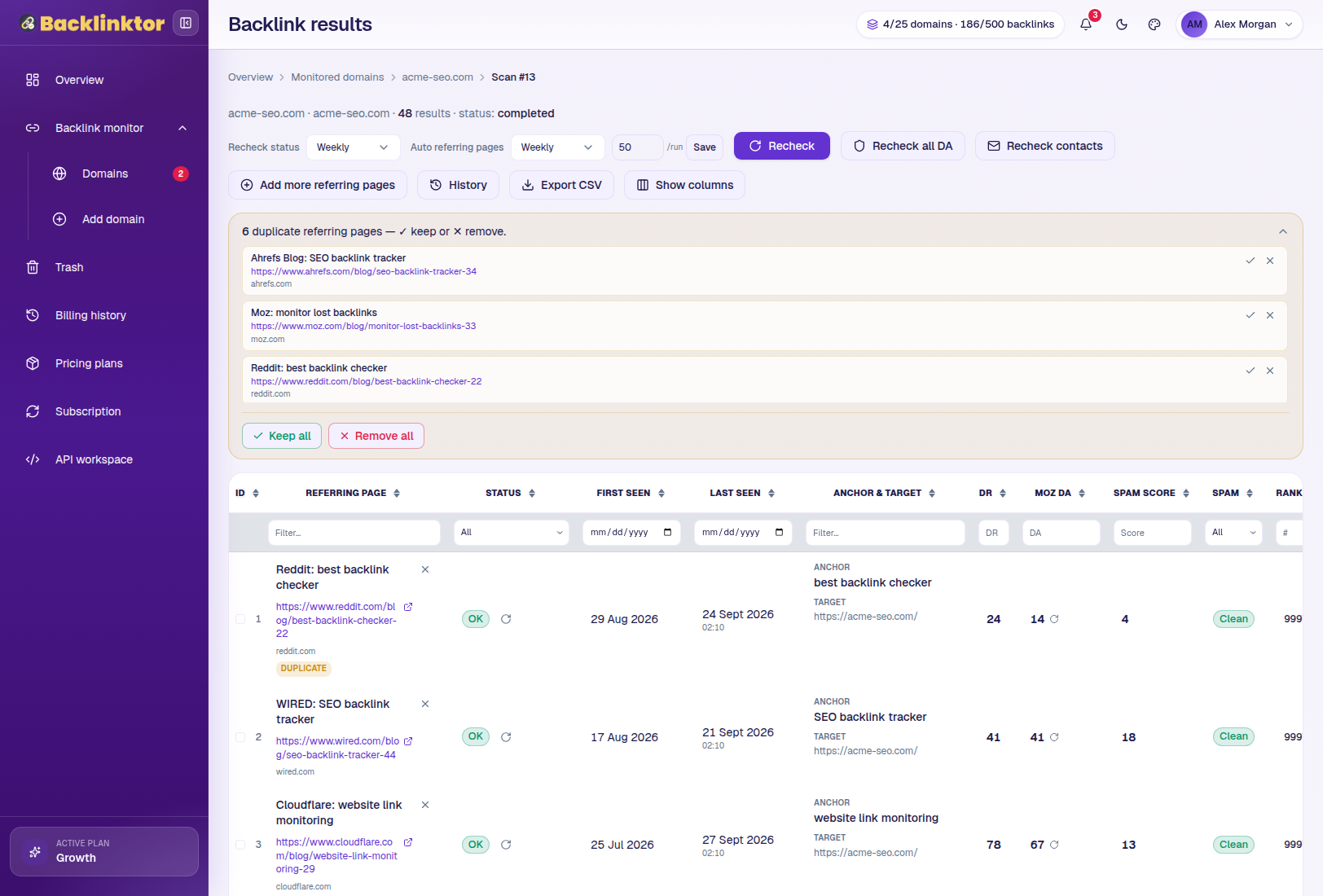
Turn referring-page data into a working backlink list.
The Results workspace can display referring page, status, first seen, last seen, anchor, Domain Rating, Moz DA, Spam Score, and other available backlink information.
Monitor
Review current status.
Analyze
Add authority context.
Filter
Prioritize important links.
Act
Export, recheck, or follow up.
Keep checking backlinks after the first scan.
Instead of repeatedly opening referring pages manually, eligible Backlinktor plans can run scheduled backlink rechecks.
Monitoring frequency and limits depend on plan.
Scheduled check starts
Active links confirmed
Missing link detected
History updated
Link ready for review
See when a monitored backlink is no longer where you expect it.
Link found
The backlink was found during the latest check.
Link not found
The expected backlink was not found. This does not necessarily indicate intentional removal.
Page unavailable
The referring page could not be reached during the check.
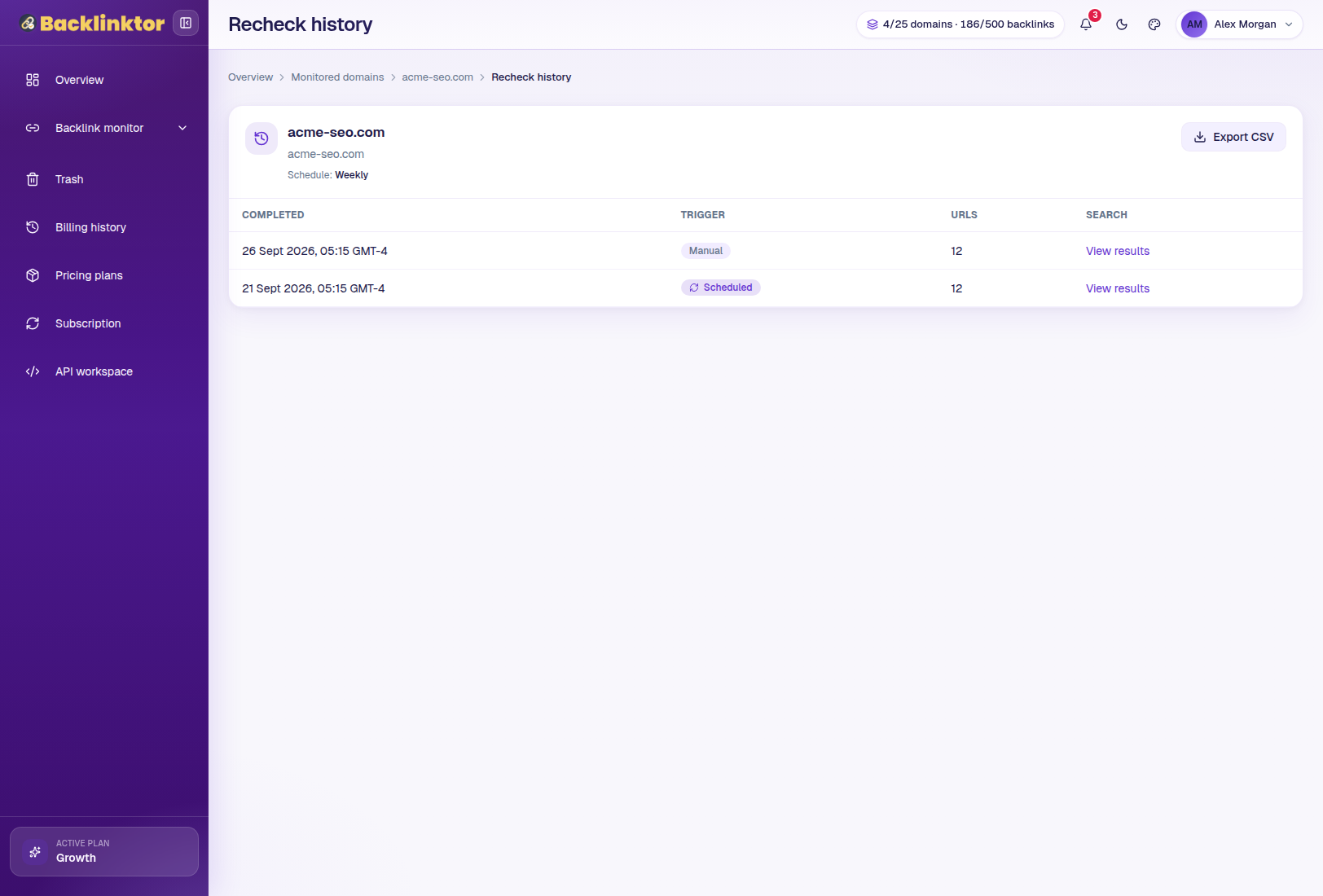
See what happened before the current status.
Supported rechecks are logged so you can inspect manual runs, scheduled or cron runs, per-URL results, OK, Missing, Page Down, and notes.
History retention depends on plan. Selected plans include history export.
Review authority signals alongside live backlink status.
Domain Rating
A comparative authority signal for referring domains.
Moz Domain Authority
Moz DA provides another domain-level comparison metric.
Moz Spam Score
Spam Score can help identify referring domains that deserve closer investigation.
Authority metrics are third-party comparison signals. They are not Google ranking scores and should not be interpreted in isolation.
Spend time on the backlinks that actually need review.
Use available filtering and Show Columns controls to focus a backlink list around the signals that matter to your workflow.
Prioritizing backlinks with a missing status.
These thresholds are interface examples, not SEO best practices.Move from monitoring into outreach.
Selected plans can locate available publisher contact information associated with referring websites, including email addresses and phone lookups on eligible higher plans.
Backlinktor vs Majestic
Backlinktor and Majestic may serve different parts of a backlink workflow. Compare the features that matter most for your specific use case.
| Capability | Backlinktor | Majestic |
|---|---|---|
| Backlink discovery | Yes | Verify current official offering |
| Domain monitoring | Yes | Verify current offering |
| Manual rechecks | Yes | Verify |
| Scheduled link rechecks | Yes, plan dependent | Verify |
| Weekly / 3-day / daily monitoring | Plan dependent | Verify |
| Automatic backlink discovery | Eligible plans | Verify |
| Domain Rating | Displayed | Do not assume; verify |
| Moz DA / Spam Score | Available on eligible plans/workflows | Verify |
| Contact Finder | Selected plans | Verify |
| Recheck History | Yes | Verify |
| CSV Export | Paid plans | Verify |
| API Workspace | Eligible plans | Verify |
| Trash / Restore | Yes | Verify |
The right choice depends on what you need from a backlink platform. If your priority is ongoing backlink monitoring, scheduled link verification, authority context, history, and follow-up workflows, Backlinktor is designed around those day-to-day tasks.
Choose a plan that fits your monitoring workflow.
Free
$0/monthFor exploring Backlinktor.
- 5 Backlink Credits
- 1 Domain
- Manual Rechecks
- 7-Day History
Starter
$11.90/monthFor individual site owners.
- 550 Backlink Credits
- 1 Domain
- Moz DA & Spam Score
- Weekly & Monthly Auto Rechecks
Growth
$24.90/monthFor growing SEO campaigns.
- 1,800 + 200 Bonus Backlink Credits
- 5 + 2 Bonus Domains
- Website Communication Contact
- Daily, Weekly, Biweekly & Monthly Auto Discovery
Need higher limits and priority support? The Agency plan is also available. Compare All Plans Get 2 months free with yearly billing on paid plans.
Questions about this Majestic alternative.
A Majestic alternative is another backlink platform that may provide a different mix of backlink research, monitoring, metrics, automation, history, or reporting functionality.
Backlinktor can be considered an alternative for users whose priorities include backlink discovery, monitored domains, backlink-status checks, scheduled rechecks, authority context, monitoring history, exports, and related backlink-management workflows. It is not presented as a replacement for every Majestic capability.
Research focuses on finding and understanding backlink data. Monitoring focuses on continuing to check important links after discovery to identify changes over time.
Eligible paid plans include scheduled backlink rechecks: weekly on Starter, every 3 days on Growth, daily on Pro, and daily monitoring capabilities at larger limits on Agency.
Backlinktor can recheck referring pages and record outcomes such as OK, Missing, and Page Down.
Backlinktor focuses on its supported backlink-monitoring data and authority signals. Majestic proprietary metrics should not be presented as Backlinktor features unless actually integrated.
Paid plans support CSV export. Selected plans also include history export.
Continue your backlink workflow.
Linkody Alternative
Compare Backlinktor for ongoing backlink monitoring and scheduled rechecks.
ExploreBacklinkMonitoring.ai Alternative
Explore Backlinktor as a structured backlink tracking workflow.
ExploreWebsite Authority Check
Review DR and Moz DA alongside backlink context.
ExploreBad Backlink Checker
Review Spam Score, authority signals, and current backlink status.
ExploreTurn backlink discovery into a daily monitoring workflow.
Discover referring pages, recheck important backlinks, identify status changes, review authority signals, keep history, and manage follow-up from one focused workspace.
Start with the Free plan and scale monitoring as your backlink workflow grows.